01 / Music
Your music,
one turn away.
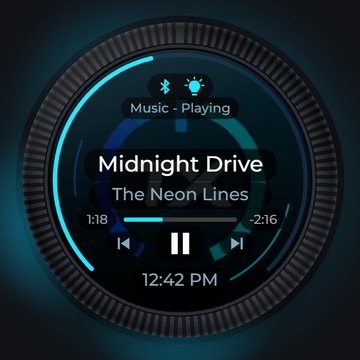
Turn for volume. Press to play or pause, twice to skip, three times to go back. Swipe left or right for the next song,
up for Siri or Google Assistant. The ring around the screen fills with the volume.
- Song, artist and time on screen (iPhone)
- Album art over Personal Hotspot*
*Album art needs your iPhone's Personal Hotspot turned on.
02 / Calls
See who's calling.
The screen goes green with the caller's name. Press to answer, hold to decline, turn for call volume.
Missed calls show as a badge on the music screen. (iPhone)
03 / DSP
Your DSP,
without the remote.
Master, subwoofer, or both together. Presets, inputs, tone, balance and fader, depending on your DSP.
Every page has its own color, and the ring around the screen shows the level.
- Helix / Brax / Match, Mosconi Gladen, Zapco HB II, Zapco DSP-Z8 IV
- Song info right on the DSP pages (DSP MUSIC)
- Plugs into the DSP's own remote port with a hand-built cable
04 / Radio
BetaNot included at launch
Talks to your radio.
Radio control is still being tested. It will not be part of the first TuneX knobs that ship;
it comes later as a free update plus an optional radio harness.
What it does: the knob works as a wired steering-wheel remote for an aftermarket head unit, with volume, tracks,
mute, source and voice. Kenwood and JVC first.
05 / Lights
Light up the car.
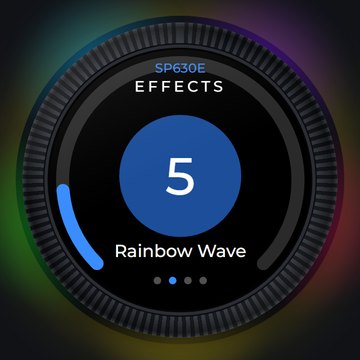
Control Bluetooth LED strip controllers from the knob: color wheel, built-in effects by name, brightness and speed.
The knob's own LED ring copies your strip.
The light controller we use →
This is the controller we build and test TuneX with (opens Amazon).
06 / Make it yours
Every color is yours.
Themes, accent color, LED ring color and 15 LED effects, the boot logo color, your own photo as the background,
screen rotation at any angle. Car lights and every DSP page can have a look of their own.